Holster your weapon in a new way for free
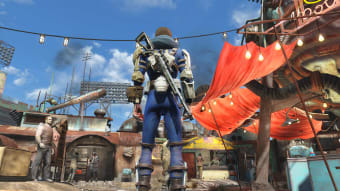
Visible Weapons is a useful free Fallout 4 Mod, which lets your weapon stay on your hip, back or holster. In order to use this mod properly, you need to holster the weapon before switching to another. In case you don’t holster the weapon before making a switch, it won’t get holstered, and the character will throw away the weapon.
Compared to C&C3, Horizon, and other Fallout modifications, the Visible Weapons download comes with multiple modes. For instance, you can make sure the weapon stays on your character even when it’s unequipped. Similarly, you can have multiple weapons equipped on the character at the same time.
Aids holstering your weapons
It’s important to note that the possibility of keeping weapons in a holster or on your back has been around for quite some time. However, most of the holsters aren’t actually usable and function like screenshots. They just stay on the back all the time and feel very static when you try to draw weapons. They can also clutter the inventory.
Visible Weapons is a Fallout 4 mod, which resolves this issue. With this Fallout modification, you can link the weapon with the weapon model. Thus, they function as a single item. Moreover, when inactive, weapon models don’t show up in the inventory.
How to use Visible Weapons?
Once you’ve installed the Visible Weapons download, you can access the config file in the ‘Aid’ section of the inventory. You can use the file to configure a one-time link between the weapon model and desired weapon. Just make sure that the weapon you need to link is currently equipped. Then, you can choose ‘Link Current Weapon’ in the Fallout modification.
The next step is to select the weapon model you wish to link. The specific item should be in the ‘Apparel’ section of the inventory, and not in the ‘Weapons’ section. Once you’re done and equip a linked weapon with this Fallout 4 mod, it will show up on your character's body.
A good choice to conveniently access weapons
With Visible Weapons download, modders can easily create weapon models for a range of weapons. These can be pre-linked to ensure they work seamlessly without any special configuration.



















.png)